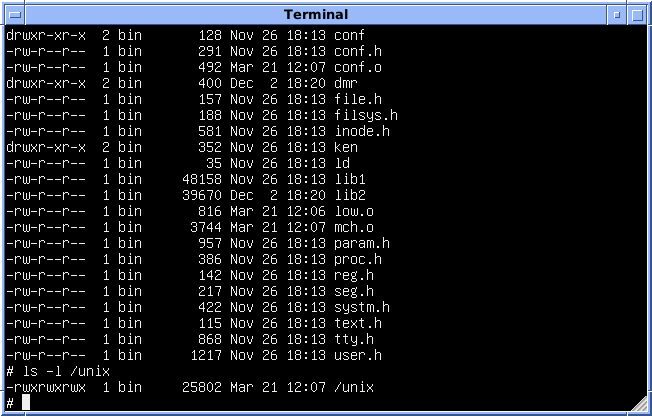
An operating system (OS) is the main system software of a computer or phone. It sits between you and the hardware. It runs your programs, manages memory and devices, keeps files in order and gives you a screen to work with. Windows, Linux, Unix, macOS and Android are operating systems. Papers ask about OS functions and types, Windows features and settings, and a few DOS and Unix commands. This page covers them all.
What an operating system is and does
The manager between you and the machine.
- UserYou give a command: click, tap or type.
- ApplicationsWord, a browser, a game.
- OSOperating systemManages the hardware and the applications.
- HardwareCPU, memory, disk, screen, printer.
| Function of the OS | What it means |
|---|---|
| Process management | Starts, runs and stops programs; decides which one gets the CPU |
| Memory management | Gives RAM to each program and takes it back |
| File management | Creates, saves, finds and deletes files and folders |
| Device management | Controls printers, keyboards, disks through device drivers |
| User interface and command interpretation | Gives you a screen (GUI) or a prompt (CLI) and acts on your commands |
| Security | Passwords and permissions: who may open which file |
A device driver is a small piece of system software that lets the OS talk to one piece of hardware, such as a printer or graphics card. Its purpose is to manage hardware resources.
- Is it an OS? Linux, Windows, Unix: yes. Safari and Edge are web browsers and GIMP is an image editor: these are application software.
- Software that manages the computer hardware and user applications is the operating system, not a client, server or "web".
Types of operating system and a short history
Batch, time-sharing, real-time, multitasking, and the people behind Unix and Linux.
| Type | In simple words | Remember |
|---|---|---|
| Batch OS | Jobs are grouped and run one after another, with no user sitting at the machine | Second generation |
| Time-sharing OS | CPU time is split into small slices shared by many users | Third generation |
| Real-Time OS (RTOS) | Must respond within a strict, predictable time | Medical devices, machines, air-bags |
| Distributed OS | Many connected computers work together like one | Networks of machines |
| Multitasking | One user runs more than one program at a time | Music + browser together |
| Multiprocessing | Uses two or more processors (CPUs) at once | Linux supports it |
Batch = 2nd, Time-sharing = 3rd: "B before T", just like in the alphabet.
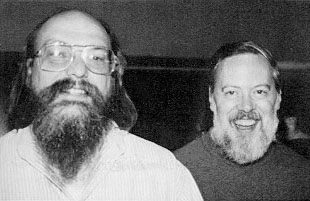
- Began Unix at AT&T Bell Labs, USA, in 1969
- Dennis Ritchie also created the C programming language

- Released Linux in 1991 as free, open-source software
- Anyone may read, change and share its source code
- 1969Unix
Begun at Bell Labs by Thompson and Ritchie. Command-line first.
- 1975Microsoft founded
By Bill Gates and Paul Allen.
- 1981MS-DOS
Microsoft Disk Operating System: typed commands only.
- 1985Windows 1.0
Microsoft's first Windows: multitasking through a graphical user interface.
- 1991Linux
Linus Torvalds releases the Linux kernel.
- 2001Windows XP
Built mainly for keyboard and mouse.
- 2004Ubuntu
A popular desktop Linux, from Canonical.
- 2015Windows 10
The version most Windows questions in these papers are about.
- 2021Windows 11
The newer version. Some Settings paths look different from Windows 10, but the past questions on this page ask about Windows 10.
Windows, Linux, Unix and mobile systems
Who makes which OS, and which ones run on desktops or phones.
| OS | Made by |
|---|---|
| Windows | Microsoft |
| macOS, iOS | Apple |
| Android, Chrome OS | |
| Bada | Samsung (its own mobile OS, used around 2010; later replaced by Tizen) |
| BlackBerry OS | BlackBerry (earlier called Research In Motion) |
| Symbian | Symbian Ltd, used mostly on Nokia phones |
| Ubuntu | Canonical (a Linux distribution) |
| Linux | Linus Torvalds and a worldwide open-source community |

Open-source software publishes its source code. Anyone may read it, change it and share it. Linux is the best-known open-source OS. Windows and macOS are proprietary (owned and closed).
- Windows is the product; Microsoft is the company that made it.
- There is no "Dell OS". Dell makes computers and ships them with Windows or Linux.
- In 1985 Microsoft launched Windows. Unix is older (1969) and Linux is newer (1991).
CLI and GUI, with DOS and Unix commands
Typing commands vs clicking icons, and the commands papers ask.
The GUI lets users run programs and give instructions through icons, menus and other visual options. The mouse is only the hardware you point with; the GUI is the software you point at.
| Job | Windows / DOS | Unix / Linux |
|---|---|---|
| List files | DIR | ls |
| Make a new folder | MKDIR (or MD) | mkdir |
| Change folder | CD | cd |
| Copy a file | COPY | cp |
| Delete a file | DEL | rm |
| Rename or move a file | REN / MOVE | mv |
The Windows desktop: taskbar, Recycle Bin and File Explorer
What you see after Windows starts, and where things go.
- Start buttonFar left. Opens the Start menu.
- Search boxType to find apps and settings.
- Open programsA button for every program you have open now, plus pinned ones.
- system trayNotification areaFar right: clock, internet, battery %, volume icons.
The first screen you see after Windows loads: wallpaper, icons and the taskbar.
Delete key or right-click → Delete sends a file here. You can restore it. Shift + Delete skips the bin.
A moving picture that appears when the computer is left idle for some time.
The background picture of the desktop, shown all the time.
When you select text and press Ctrl + C, the copy goes to the operating system's clipboard, a temporary store in memory. Ctrl + V pastes it, even into another program.
Windows 10 settings and Control Panel paths
Mouse, date and time, display, printers and the version number.
| Task | Path in Windows 10 |
|---|---|
| Mouse settings (quick) | Start → Settings → Devices → Mouse |
| Mouse properties (classic) | Control Panel → Hardware and Sound → Devices and Printers → Mouse → Apply |
| Add or remove a printer | Control Panel → Hardware and Sound → Devices and Printers |
| Time and time zone | Start → Settings → Time & Language → Date & time |
| Change date and time (other ways) | Right-click the clock → Adjust date/time; or Control Panel → Clock, Language and Region → Date and Time |
| Display / appearance | Right-click the desktop → Personalize (or Display settings) |
| Windows Features | Control Panel → Programs → Programs and Features; or Settings → Apps → Apps and features → Optional features; or search "Windows Features" |
| Computer name, hardware, remote, protection | System Properties |
| See the Windows version | Win + R (Run) → type winver |
- The Settings app has no "Programs" section. "Programs and Features" is in Control Panel. Settings uses Apps.
- Mouse and printers are hardware: look under Devices (Settings) or Hardware and Sound (Control Panel).
- The label is Date & time, date first. "Day & Time" and "Time & Date" are made up.
- Right-clicking the clock gives date/time options, not display settings.
Quick revision
Full forms, traps and one-line facts.
- OS
- Operating System
- MS-DOS
- Microsoft Disk Operating System
- GUI
- Graphical User Interface
- CLI
- Command Line Interface
- RTOS
- Real-Time Operating System
- Who made Windows?
- Microsoft (Windows 1.0, 1985)
- Who made Linux?
- Linus Torvalds (1991)
- Samsung's mobile OS
- Bada
- Rename a file in Unix
- mv
- New folder in Windows CMD
- MKDIR (MD)
- Windows version in Run
- winver
- Clock and battery icons
- Notification area
- The taskbar shows the programs you have open now, not every program ever installed or used.
- Screen saver = when idle. Wallpaper = always.
- The ALU does arithmetic and the compiler translates programs. Neither is an OS function.
- Batch = 2nd generation, time-sharing = 3rd generation.
Also asked onceTap to open
- Touch: desktop Windows XP was built for keyboard and mouse, without a touch interface. Windows 7 brought multi-touch gestures, and Windows 10 supports touch too.
- System Properties is the Windows section for the computer name, hardware settings, user profiles, system protection and remote (connectivity) settings.
- In File Explorer, the folder's location appears in the address bar near the top of the window.
- Ubuntu is an example of a desktop operating system (iOS, Symbian and Android are mobile).
- Multitasking = the ability to run more than one program at a time. (Overloading, reading and scanning are not.)
You deleted an important file by pressing Delete. Where will you find it, and how is Shift + Delete different?
Show answer
It is in the Recycle Bin; open it, right-click the file and choose Restore. Shift + Delete skips the Recycle Bin and deletes the file permanently.