Microsoft Excel (MS Excel) is a spreadsheet program. A spreadsheet is a big table of rows and columns. You type numbers into it, and it does the sums for you. It can also sort data and draw charts. Punjab Police SI and Constable papers ask about the Excel window, cell addresses, formulas, references, functions, charts and Excel keys. This page shows each one on a labelled screen or a short video.
Know the screen
The top of the window, the grid, the status bar and the tabs.
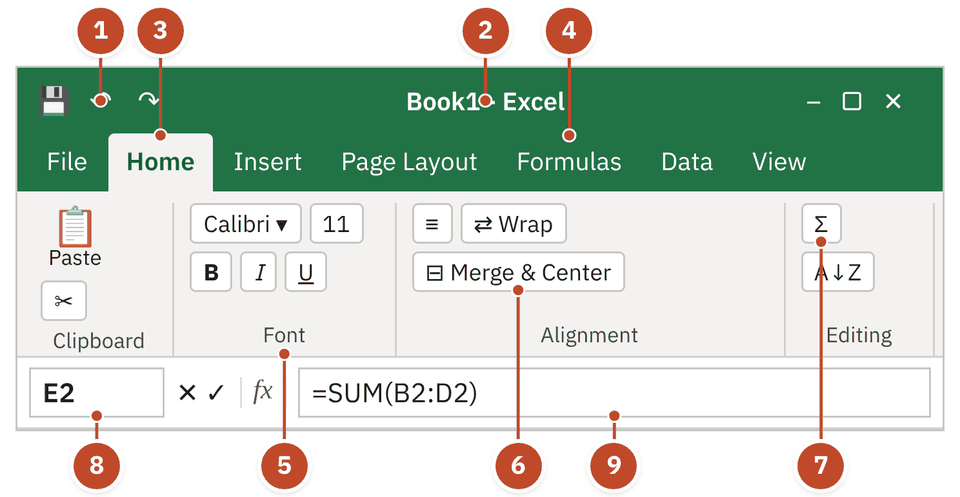
- 1Quick Access Toolbar — Save, Undo and Redo. Always visible, one click away.
- 2Title bar — The bar at the very top of the window. Shows the file name and the program: Book1 - Excel.
- 3Home tab — A ribbon tab. Each tab opens a different set of tools.
- 4Formulas tab — Holds the Function Library: Logical, Financial, Math & Trig and more.
- 5Font group — Tools sit in groups. The group name is written at the bottom: Font, Alignment, Editing.
- 6Merge & Center — In the Alignment group. Joins cells into one and centres the text.
- 7AutoSum Σ — In the Editing group. Adds up a row or column in one click.
- 8Name Box — Shows the address of the active cell, here E2.
- 9Formula bar — Shows what the active cell really holds: =SUM(B2:D2). The cell itself shows only the result, 235. You can edit the cell here too.
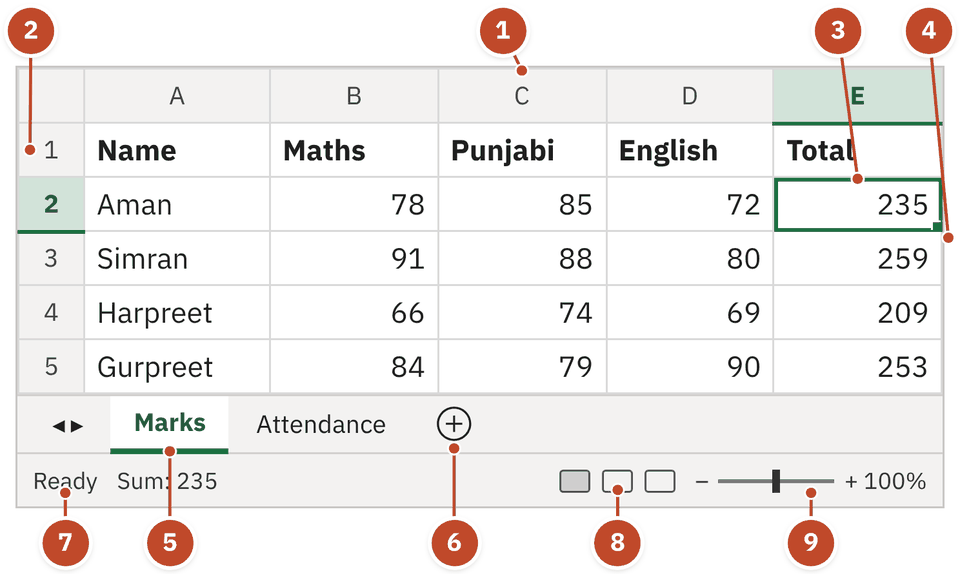
- 1Column heading — Columns are named by letters: A, B, C …
- 2Row heading — Rows are named by numbers: 1, 2, 3 …
- 3Active cell E2 — The selected cell has a thick border. Its address is column letter + row number.
- 4Fill handle — The small square at the corner of the active cell. Drag it to copy a formula.
- 5Sheet tab — Marks is one worksheet. A workbook holds many worksheets.
- 6New sheet (+) — Adds another worksheet to the workbook.
- 7Mode indicator — On the status bar. Ready = waiting for you; Enter = typing a new entry; Edit = changing an entry (after F2); Point = picking cells for a formula. There is no "Start" mode.
- 8View buttons — Normal, Page Layout, Page Break Preview.
- 9Zoom — Makes the sheet look bigger or smaller on screen.
| Ribbon tab | Tools exams ask about |
|---|---|
| Home | Cell Styles, Format as Table, Conditional Formatting, Merge & Center, Wrap Text, Delete, Clear, Sort & Filter |
| Insert | Charts, PivotTable, Pictures, Links |
| Page Layout | Margins, Orientation, Size, Print Area |
| Formulas | Function Library (Logical, Financial, Math & Trig and more) |
| Data | Sort, Filter, Subtotal (Outline group) |
| Review | Spelling, comments, protect sheet |
| View | Normal, Page Layout, Page Break Preview, Custom Views |
Workbook, worksheet and cell
The three words every Excel question starts with.
A spreadsheet keeps numbers in rows and columns and runs formulas on them. It is the tool for detailed analysis of numerical data. A calculator does one sum at a time. A word processor is for text. MS Excel, LibreOffice Calc and Google Sheets are spreadsheet programs.
An Excel or LibreOffice Calc file is a workbook. Excel saves it as .xlsx (older: .xls). Calc saves it as .ods.
One page inside the workbook. Its name shows on a tab at the bottom. A workbook is a collection of worksheets.
The box where a row meets a column. Rows are numbers (1, 2, 3). Columns are letters (A, B, C).
A field is a database word, not the Excel name for a cell.
- Column letter firstCount the alphabet: A = 1st, E = 5th, J = 10th, T = 20th.
- Row number secondWrite the row number just after the letter.
- answerAddress5th row, 5th column = E5. 21st row, 10th column = J21.
Formatting and editing tools
Make the sheet look neat: styles, merge, number formats, clear and delete.
Joins the selected cells into one larger cell and centres the content.
Shows long text on extra lines inside the same cell. Merges nothing.
Applies a ready set of font, fill and number format in one click.
Turns a range of cells into a table with its own style and filter buttons.
Changes a cell's look based on its value, for example Data Bars. Remove it with Clear Rules.
- Drag across A1 to E1 to select the five cells of the title row.
- Click Merge & Center (Home tab → Alignment group).
- The five cells become one big cell, and the title sits in the centre.
Path: Home → Conditional Formatting → Clear Rules. It offers "Clear Rules from Selected Cells" and "Clear Rules from Entire Sheet". Excel uses the word Clear, not Delete or Remove.
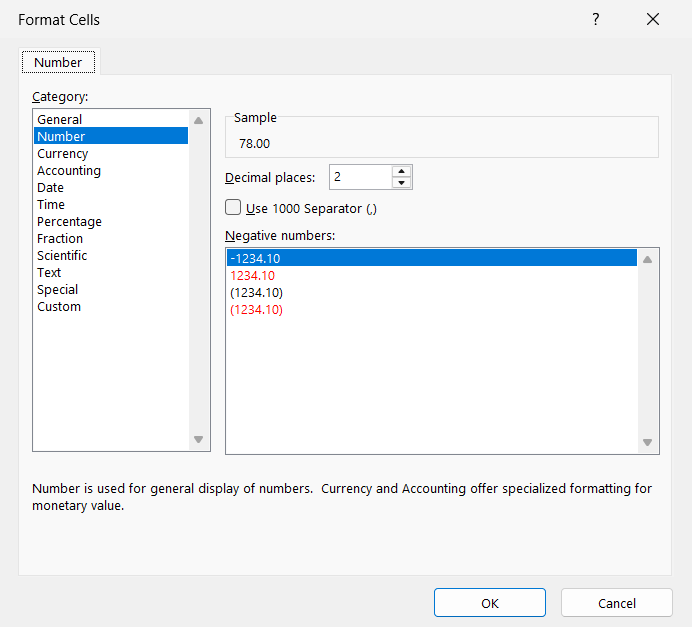
- 1Number tab — Press Ctrl+1 to open Format Cells. This tab changes how a number looks; the value stays the same.
- 2Category list — General, Number, Currency, Accounting, Date, Time, Percentage, Fraction, Scientific, Text, Special, Custom. Percentage shows 0.25 as 25%. Scientific shows 12300 as 1.23E+04. Currency has the shortcut Ctrl+Shift+$.
- 3Decimal places — Digits after the decimal point. With 2, the mark 78 shows as 78.00 in the Sample.
- 4Negative numbers — Four looks: plain with a minus sign, in red, in brackets (parentheses), or red in brackets.
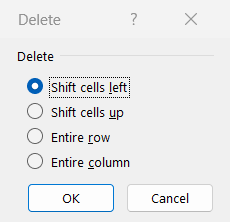
- 1Shift cells left — Cells on the right move left to fill the gap.
- 2Shift cells up — Cells below move up to fill the gap.
- 3Entire row — Deletes the whole row of the selected cell.
- 4Entire column — Deletes the whole column of the selected cell.
Formulas and cell references
Start with =, use the right sign, and know when $ locks a cell.
A formula is a calculation you type after an = sign, like =A1+B1. A function is a ready-made formula with a name, like =SUM(A1:A10). Both calculate. Sorting does not calculate; it only changes the order of rows.
- Click cell E2, where Aman's total will go.
- Type =SUM(B2:D2). The range B2:D2 lights up: the three marks to add.
- Press Enter. E2 shows 235 (78 + 85 + 72).
- Drag the fill handle down to E6. Excel fills in 259, 209, 253 and 198.
- Select E4. The formula bar shows =SUM(B4:D4): the relative reference moved down row by row.
| Operation | Sign | Example |
|---|---|---|
| Add | + | =A1+B1 |
| Subtract (minus / hyphen key) | - | =A1-B1 |
| Multiply (asterisk key) | * | =A1*B1 |
| Divide | / | =A1/B1 |
| Power (caret) | ^ | =C1^D1 |
- C1 holds 8 and D1 holds 3. Click cell E1.
- Type =C1^D1.
- Press Enter. E1 shows 512, because ^ means "to the power of": 8 × 8 × 8.
- A2 holds 500. In B2, type =A2.
- Press F4: =$A$2. Absolute: column and row are both locked.
- Press F4 again: =A$2. Mixed: only the row is locked.
- Press F4 again: =$A2. Mixed: only the column is locked.
- Press F4 once more: =A2. Back to relative.
Functions and their categories
SUM, AVERAGE, AND, N and the families they belong to.
| Function | What it gives | Category |
|---|---|---|
| =SUM(A1:A5) | Total of the cells | Math & Trig |
| =AVERAGE(A1:A5) | Average (mean) | Statistical |
| =COUNT(A1:A5) | How many cells hold numbers | Statistical |
| =MAX(A1:A5) / =MIN(A1:A5) | Largest / smallest value | Statistical |
| =IF(E2>=200,"Pass","Fail") | One answer if true, another if false | Logical |
| =AND(...) / =OR(...) / =NOT(...) | TRUE or FALSE | Logical |
| =TODAY() / =NOW() | Today's date / date and time; they update | Date & Time |
- Click cell F2 in the Result column.
- Type =IF(E2>=200,"Pass","Fail"): a total of 200 or more gives Pass; anything less gives Fail.
- Press Enter. F2 shows Pass, because Aman has 235.
- Fill down: Pass, Pass, Pass, Pass, Fail. Ravi has 198, which is less than 200.
- =AND(1+1,1-1) shows FALSE. 1+1 = 2 counts as TRUE, but 1-1 = 0 counts as FALSE. AND needs every part TRUE.
- =N("Hello") shows 0. N turns any text into 0.
- Select each cell in turn. The formula bar shows the formula; the cell shows the result.
N(value) turns a value into a number. A number stays the same. TRUE gives 1 and FALSE gives 0. Any text gives 0, so =N("Hello") shows 0.
Number-base converters such as OCT2HEX (octal to hexadecimal), BIN2DEC, DEC2HEX.
Money and bond functions such as ODDFPRICE, PMT, FV.
IF, AND, OR, NOT, IFERROR.
Name pattern hint: anything like OCT2HEX or BIN2DEC is Engineering.
Sorting, subtotals and charts
Put data in order, then turn it into a picture.
Found on the Data tab (Outline group). It adds a total at every change in a chosen column. Sort that column first.
| Chart | Shape | Best for |
|---|---|---|
| Pie | A circle cut into slices | Parts of one whole |
| Column / Bar | Standing / lying rectangles | Comparing groups |
| Line | Points joined by a line | Trends over time |
| Area | A line chart with the space below filled | Size of change over time |
| Scatter (XY) | Loose dots on a grid | Link between two number sets |
- Chart Title, Axes, Axis Titles
- Legend, Data Labels, Data Table
- Gridlines, Error Bars, Trendline
- Appear on the ribbon when a chart is selected
- Three tabs: Design, Layout, Format
- Called chart tools, not graph tools
Keys that save time in Excel
Moving between cells, editing and stamping the date.
| Key | What it does in Excel |
|---|---|
| Enter | Confirms the entry and moves down one cell |
| Shift+Enter | Moves up to the cell above in the same column |
| Tab / Shift+Tab | Moves right / left one cell |
| Alt+Enter | New line inside the same cell |
| Ctrl+Enter | Confirms and stays in the same cell |
| F2 | Edit the active cell |
| Esc | Cancel the edits before you press Enter or Tab |
| Ctrl+G / F5 | Open the Go To box |
| Ctrl+Home / Ctrl+End | Go to cell A1 / the last cell with data |
Quick revision
Keys, traps, the story of the spreadsheet and one-line facts.
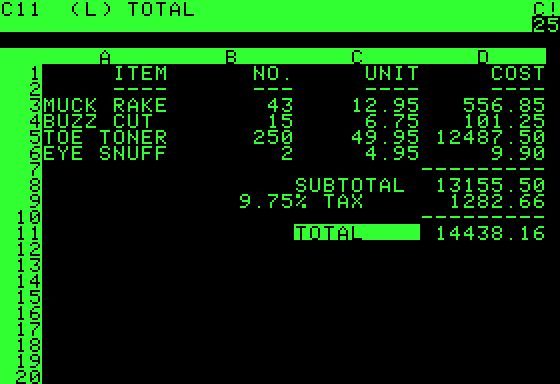
- F4
- Switch relative / absolute reference
- F2
- Edit the active cell
- Esc
- Cancel the edit
- Ctrl+;
- Today's date
- Shift+Enter
- Cell above
- Alt+Enter
- New line inside a cell
- Ctrl+G
- Go To box (same as F5)
- Ctrl+Shift+$
- Currency format
- Ctrl+1
- Format Cells box
- Ctrl+Home
- Go to cell A1
- Column first, row second: J21, never 21J.
- ^ is power, not multiply: 8^3 = 512.
- F4 changes reference type; F2 only edits.
- Filter hides, Sort arranges.
- Data Bars = conditional formatting, not a chart element.
- Subtotal is on the Data tab, not the Formulas tab.
- Print Area is on the Page Layout tab.
Also asked onceTap to open
- The title bar is the bar at the very top of the spreadsheet window.
- An Excel or LibreOffice Calc file is called a workbook.
- Both true: a workbook is a collection of worksheets, and Ctrl+Shift+$ applies the Currency format.
- A cell is where a row and a column meet (5th row, 5th column = E5).
- A spreadsheet is the tool for detailed analysis of numerical data.
- An image cannot be entered into a cell. Text, numbers and dates can.
- Formulas and functions calculate; data sorting does not.
- Neither statement is false: a cell reference is relative by default, and relative references change when a formula is copied.
- AND() is a Logical function. COUNT() is Statistical and SUM() is Math & Trig.
- Both pairs are correct: OCT2HEX – Engineering and ODDFPRICE – Financial.
- Percentage and Scientific are both number format styles.
- Negative numbers can be shown in parentheses and in red.
- Cell Styles is applied from the Home tab (Home → Cell Styles).
- Format as Table turns a range into a table with its own style.
- AutoFormat quickly applies a ready-made set of formats to a range. In newer Excel it is not on the ribbon; you add it to the Quick Access Toolbar.
- The Delete dialog has no "Shift cells right".
- To remove all conditional formatting from a sheet, use Clear Rules.
- Sort & Filter is in the Editing group of the Home tab (and also on the Data tab).
- Linked Views is not a View-tab option.
- Charts show workbook data as pictures for comparisons and trends; in Excel 2010 a set of chart tools in three tabs appears when you insert one.
- Ctrl+G opens the Go To box; Alt+Enter adds a new line inside a cell; Esc cancels an edit.
- Default column width in a new sheet is 8.43 (measured in characters of the standard font, about 64 pixels). One paper printed the unit as "points". The default row height is 15 points.
Cell B2 holds 10. You type =B2^2 in C2, then copy C2 down to C3. What does C3 contain, and why?
Show answer
C2 shows 100 (10 to the power 2). C3 holds =B3^2, because B2 is a relative reference and moves down one row when copied. To keep B2 fixed, write $B$2 (press F4).